How to Create a Personal Financial Dashboard in Google Sheets (2026): Complete Beginner's Guide
Learn how to create a personal financial dashboard in Google Sheets to track income, expenses, savings, debt, and financial goals with this 2026 guide.
FINANCE
CryptoFinora Team
7/26/20264 min read
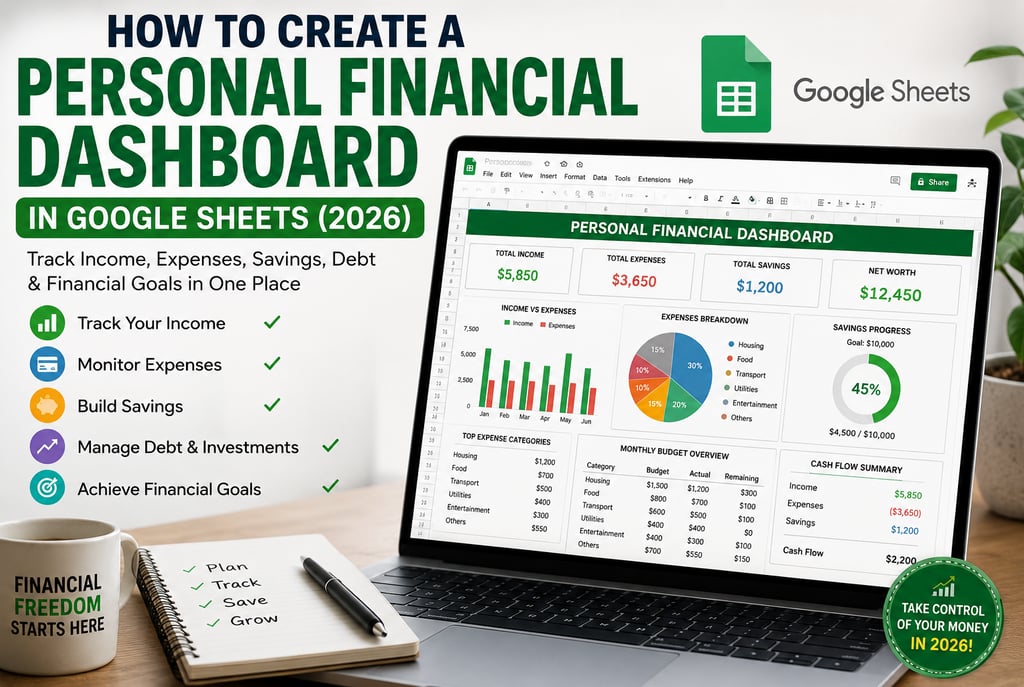
What Is a Personal Financial Dashboard?
Managing money becomes much easier when all of your financial information is organized in one place. A personal financial dashboard is a spreadsheet that automatically tracks your income, expenses, savings, investments, debt, and monthly financial goals.
Instead of checking multiple banking apps or trying to remember where your money went, you can see your entire financial picture from a single dashboard.
Google Sheets is one of the best free tools for building this dashboard because it works on any device, updates in real time, and can be customized to fit your financial needs.
Why You Need a Financial Dashboard in 2026
With rising living costs, subscription services, digital wallets, and multiple income sources, managing personal finances has become more complicated than ever.
A financial dashboard helps you:
Track every dollar you earn.
Monitor monthly spending habits.
Build an emergency fund.
Stay within your budget.
Pay off debt faster.
Monitor savings goals.
Prepare for unexpected expenses.
Make smarter financial decisions.
People who regularly monitor their finances are generally more aware of their spending patterns and can adjust their budgets more effectively over time.
Why Google Sheets Is the Best Choice
Google Sheets offers several advantages over traditional budgeting methods.
Free Forever
You don't need to purchase expensive budgeting software.
Cloud-Based
Your dashboard updates automatically and can be accessed from your phone, tablet, or computer.
Highly Customizable
You can create categories, charts, formulas, and financial reports that fit your lifestyle.
Automatic Calculations
Google Sheets instantly updates totals and charts whenever you enter new financial data.
What Your Dashboard Should Track
A complete personal finance dashboard should include:
Monthly Income
Fixed Expenses
Variable Expenses
Savings
Emergency Fund
Investments
Credit Card Debt
Loan Payments
Net Worth
Monthly Budget Progress
Tracking these categories consistently provides a clearer picture of your financial health than relying on memory alone.
Step 1: Create a New Google Sheet
Open Google Sheets and create a blank spreadsheet.
Rename it:
Personal Finance Dashboard 2026
Create these worksheets:
Dashboard
Income
Expenses
Savings
Investments
Debt
Monthly Budget
Keeping data in separate sheets makes your dashboard cleaner and easier to maintain.
Step 2: Set Up Your Income Tracker
In the Income sheet, create the following columns:
Date
Income Source
Category
Amount ($)
Jan 5
Salary
Job
$3,500
Jan 12
Freelance
Side Income
$450
Jan 20
Dividends
Investment
$80
At the bottom, calculate:
Total Monthly Income
Average Monthly Income
Highest Income Month
This helps you understand where your money comes from and how stable your income is.
Step 3: Build an Expense Tracker
Create these categories:
Housing
Rent or Mortgage
Utilities
Internet
Transportation
Fuel
Public Transit
Car Insurance
Food
Groceries
Restaurants
Coffee
Health
Insurance
Medicine
Gym
Entertainment
Streaming Services
Movies
Shopping
Miscellaneous
Gifts
Travel
Other Expenses
Recording every expense—even small ones—can reveal spending patterns that are easy to overlook.
Step 4: Add a Savings Tracker
Track your progress toward financial goals with columns like:
Goal
Target Amount
Current Savings
Remaining
Emergency Fund
$10,000
$4,500
$5,500
Vacation
$3,000
$1,200
$1,800
New Laptop
$2,000
$750
$1,250
Watching your progress can help keep long-term goals motivating.
Step 5: Track Investments
Include information such as:
Investment Name
Asset Type
Purchase Date
Amount Invested
Current Value
Profit/Loss
Examples:
Index Funds
ETFs
Stocks
Bonds
Cryptocurrency
Retirement Accounts
Review this sheet regularly to understand how your investments contribute to your overall financial picture.
Step 6: Monitor Your Debt
List all outstanding debts:
Debt
Balance
Interest Rate
Minimum Payment
Credit Card
$2,300
18%
$75
Student Loan
$18,000
5%
$220
Car Loan
$8,000
4%
$260
Tracking debt in one place makes it easier to prioritize repayments and monitor progress over time.
Step 7: Create Your Dashboard
Your dashboard should display key metrics at a glance, including:
Total Income
Total Expenses
Monthly Savings
Savings Rate
Total Investments
Total Debt
Net Worth
Budget Progress
Emergency Fund Progress
Using simple charts and progress bars can make these figures easier to understand.
Best Practices
Update your dashboard at least once a week.
Categorize transactions consistently.
Review monthly trends instead of focusing on one-off purchases.
Back up important financial data.
Set realistic savings and spending goals.
Advanced Features to Make Your Dashboard Smarter
Once your basic dashboard is working, you can add advanced features that save time and provide better financial insights.
1. Monthly Spending Trends
Create a line chart showing how your expenses change from month to month. This helps you identify seasonal spending and adjust your budget accordingly.
2. Category Breakdown
Use a pie chart to see where most of your money goes, such as housing, groceries, transportation, or entertainment.
3. Savings Progress
Add a progress bar that shows how close you are to reaching your savings goals.
4. Net Worth Tracker
Calculate your net worth every month.
Formula:
Net Worth = Total Assets − Total Liabilities
Watching your net worth grow over time is one of the best indicators of improving financial health.
Helpful Google Sheets Functions
These built-in functions make your dashboard more powerful:
SUM() – Adds income or expenses.
AVERAGE() – Calculates average monthly spending.
IF() – Creates budgeting alerts.
COUNTIF() – Counts transactions by category.
FILTER() – Displays only specific data.
SORT() – Organizes financial records.
SPARKLINE() – Creates mini charts inside cells.
Learning these formulas can reduce manual work and improve accuracy.
Common Budgeting Mistakes to Avoid
Not Tracking Small Purchases
Small daily expenses can add up significantly over a month.
Forgetting Annual Bills
Include yearly expenses like insurance or subscriptions in your budget.
Setting Unrealistic Goals
Choose savings targets that fit your income and lifestyle.
Ignoring Emergency Savings
Aim to build an emergency fund before making high-risk investments.
Never Reviewing Your Budget
A budget should evolve with your financial situation. Review it monthly.
Tips for Long-Term Financial Success
Pay yourself first by saving before spending.
Increase your savings whenever your income grows.
Avoid unnecessary debt.
Build multiple income streams if possible.
Review your financial dashboard every month.
Set clear short-term and long-term financial goals.
Invest consistently for long-term growth.
Celebrate milestones to stay motivated.
Frequently Asked Questions (FAQs)
Is Google Sheets free for budgeting?
Yes. Google Sheets is free with a Google account and offers enough features for most personal budgeting needs.
How often should I update my financial dashboard?
Updating it weekly keeps your information accurate while avoiding a large backlog of transactions.
Can beginners create a financial dashboard?
Absolutely. Start with basic income and expense tracking, then gradually add charts and advanced features.
Is Google Sheets safe for financial tracking?
Google Sheets uses security features provided by your Google account. Enabling a strong password and two-factor authentication can improve account security.
Should I track investments in the same dashboard?
Yes. Including investments alongside income, expenses, savings, and debt provides a more complete picture of your finances.
Final Thoughts
A personal financial dashboard is more than just a spreadsheet—it's a practical tool that helps you understand where your money comes from, where it goes, and how close you are to reaching your financial goals.
By spending a few minutes each week updating your dashboard, you can make better budgeting decisions, reduce financial stress, and build long-term wealth. Google Sheets offers a flexible and cost-effective way to manage your finances, whether you're a student, professional, freelancer, or business owner.
The most important step is to begin. Your first dashboard doesn't have to be perfect. As your financial knowledge grows, you can continue improving it with new charts, formulas, and insights
CryptoFinora
Your trusted source for crypto news, blockchain guides, Bitcoin analysis, and personal finance insight.
COMMUNICATION
muneebrehman2224@gmail.com
© 2026 CryptoFinora. All Rights Reserved - Trusted Crypto & Finance Insights.